Showing posts with label app review. Show all posts

Sunday, 1 November 2015

Fitbit Fitness trackers P1

Welcome to 5.14 fitness, 

Hi everybody. It was addressed in the last post how and why their has been a lack of posts. I apologise for it myself!
So, in this post I will shortly talk about my interest in the Fitbit ftiness trackers. Fitbbit is a company who sell fitness bands ( like smart watches ) products that are for tracking and viewing your fitness. Fitbit currently sell 4 products, I believe ,  and they all range in price. 


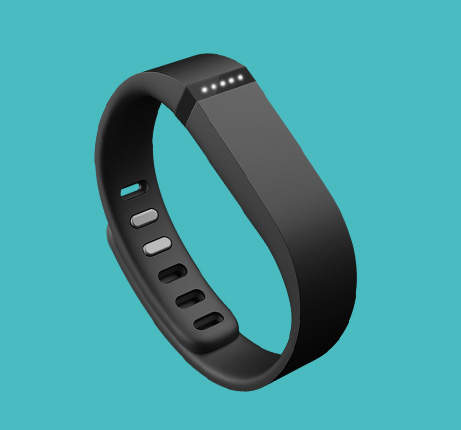
The first tracker, the Fitbit flex, is about £35 I think, and it has the most basic features of the 4 due to this price. However, it is still a nifty device and the features are Ideal for somebody who wants to keep track of their exercise and sleep. The trackers can pick up on how many steps you have walked, for how long, at what time etc... The tracker keeps a basic, yet accurate, recording on what you do in the day. It will log if you go out for a run, and the band will allow you to see how you did and how to improve.
I believe that the watch pairs to your device ( phone etc) and from there you can view your data 
The band also tracks your sleep and can wake you up without making a noise, which is very handy.
The band looks stylish and sleek, as you can see on the right. 

The next trackers, the Fitbit charge, is about £60. This tracker has the same features as the flex, however it has a few new things. First of all, it has a display on it which tells the time and gives data whilst you are on the go. It can track calories burned , active minutes steps climbed and many more. It has caller ID so links with your phone just like a smart watch. It is more accurate than the flex and also has a extremely long battery life.

Both these products come in a variety of colours, and they both look really nice to have on your wrist. They are cheap and stylish, and perfect if you are somebody who exercises regularly and wants to track your fitness.

Next post I will talk about the other two products, one of which is the tracker I think is the best and the one I am most likely to buy. 

Thanks for reading, please like and subscribe!


Friday, 14 August 2015

My start to Jogging/Running - Week 1

Welcome to 5.14 fitness, 

As you can see from my last post, I had decided to go running four times a week whilst I am on my six week holiday. The reason for this was to have an exercise which I could maintain and fit into my schedule as it gets jumbled around and becomes hectic due to the holiday. I wanted to do something that makes you feel good and helps as I will be eating more and being active less. Running was what I decided on doing, and I have done exactly that.

My first run, about three weeks ago, gave me a  good start to running. I ran 3.4 miles ( a little over 5k ) and did it on a route which I made on Strava . This allowed me to not worry about the route I was taking and just focus on the running. I ran a lot faster than I thought I would, which is probably thanks to Insanity. I went uphill quite a bit which I admit was a bit of a mistake, but overall I did quite well. 

The benefits I felt on this first run were pretty good. First of all, when I got back I felt very happy and good , due to how hard I had worked an what I had done. It made me feel more confident about myself and , most of all, allowed me to enjoy my day more. I also managed to see more of where I live. There are places which I ran through that I had never been before, and it was cool to discover these new areas. It was also good to post my results on Strava, so that others can see it. It was good to compare my results to other people and more notably, my pro cousin. 

The time for my first run was not brilliant, and the worst of all my runs by a long shot. This was probably because I took at easy, as on your first run you should not push yourself to hard. It is important to ease yourself into these things sometimes. I didn't experience any injuries and although it wasn't enjoyable, the run was definitely beneficial.
Over the course of the next week, I ran 4 more times and Improved greatly each time. This was because I pushed myself more and paced myself better. I took slightly different routes every time to make the run more interesting. 

My last run that week was a 5k run, and I performed very well in it. I completed 5k in 21 minutes, which gave me an average pace of 7:08 minutes a mile. For a beginner, I found this was very good and gave me a boost in confidence for more upcoming runs. I also had a 200ft elevation gain, which made things a lot harder of course. 

Add me on Strava - Will Henry Roberts

Next post I will talk about my second and third weeks and more about results etc..
Sorry about lack of posts, it has been poor I admit but I will try to post regularly on a Friday or Saturday now.

Thank for reading, please subscribe and like (we will like and subscribe back) . Thanks again and peace! 


Saturday, 14 March 2015

Cardio - What To Do? Part 1

Welcome to 5.14 fitness, 


Today I will be posting about Cardio and the different ways in which you could do it.

Almost every sport has cardio implemented, whether it is running in football or swimming in water polo. This cardio is key in order to become a healthier, fitter and thinner person. It is important that Cardio is done ,as without it, a good measure of health can not be achieved. Sport is the perfect way to do Cardio, but there is other ways that can sometimes be more effective ( Jogging for example). The important rule here is: Cardio is key. Aerobically exercising : Getting your heart rate up, sweating and breathing like hell is important for us! 

The NHS states that a 19-64 year old adult should do at least 150 minutes ( 2 hours 30 minutes ) of moderate-intensity aerobic activity such as cycling or fast walking every week, or, 75 minutes (1 hour and 15 minutes) of vigorous-intensity aerobic activity such as running or a game of singles tennis every week. You should really aim for this to be deemed healthy and fit. However, I understand it can be difficult. 

All of us live different lives, and therefore we only have space or time for certain things. Because of this, it can be hard to find what exercise we are able to do or what interests us. It can be hard sometimes to find the right sport that keeps us motivated and eager. Whether it is badminton to hockey, there is a sport out there for all of us: you just have to find it. 

Unfortunately, even if we find the right exercise we may still not be able to do it; work or other past times might restrict us from getting to places or doing the things we want to do. I myself would love to do some kind of karate or martial arts, however I do not have the time, the money or the means of transport to get to somewhere which offers that. 

So, compromises have to be made and we have to find some sort of Cardio that we have time to do regularly, have the money to afford, the space to do it, and the motivation to carry on going. Finding this can be hard, and so the main options have to be clear and helpful.  To help myself and also you, I will be researching different sports and cardio methods and posting about them regularly- In order for us to have to have a wider knowledge of exercise and what the most effective methods are. 

In part 2, I will be going over the three most well known forms of exercising, Walking, Running and Cycling, and also talking about some well-known sports. 
Thank for reading, please follow and like (we will like and follow back) . Thanks again and peace! 


Thursday, 13 November 2014

Google fit review

Welcome to 5.14 fitness

Hi guys, this is the third fitness/health review that I am doing. This one will be quite brief, as it is about an app that does not have much to it. The app itself is Google fit, and it is simple yet quite effective. It is very similar to apples health, which is also an app that is tailored to specific phones, in healths case IOS. Google fit is an app that you can download from the Google play store, but I expect it will come pre-installed to some phones from android.

The Google fit interface
Google fit is a very basic app, that runs in the background, which is useful. The app is all about tracking what fitness you do during the day, and displaying it to you in a simple and helpful way.
You sign into the app on a Google+ account, and the first set goals that you want. The goals you set are how long you aim to do exercise a day, and Google fit uses this as a basis for everyday. You also add your weight and height, but I am sure that this is not compulsory,

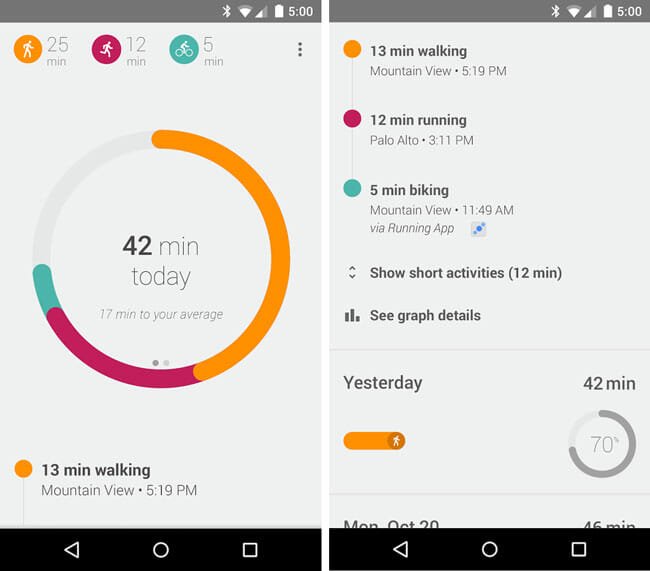
As seen on the right, every day this is the screen that you are welcomed to on Google fit, The circle in the middle is the amount of exercise you have done that day, and as you can see the person in the image has done 42 minutes. When you have completed your time, the circle is complete and an animation occurs to congratulate you on success that day. The best thing about this is, you do not have to do a thing to complete your day, in terms of the app. If you have your phone with you all day , like I do , It tracks whether you ran, cycled or walked without you knowing about it. It is incredibly accurate with this, and I was really surprised to see how long I walked in a day - It was a lot longer than I expected.

As you can see in the picture, Google fit displays the different exercise you have done through different colours, and you can when you did them and how long you did them for, For example, in the picture ,  the person has ran 12 minutes, and you can see at what time of the day he or she ran, Unlike Strava or other apps like it, Google fit just detects when you do this, you yourself does not have to do anything. If you click the display, the circle and data turn to how many steps you have taken, instead of minutes, This , for me , is not very useful; however, it does display if you have exceeded your average or not.

You can also add minutes for when you do weight training, circuit training, or any other sports the phone can not detect. Although, they are all displayed as "other", so there are only four options to put into Google fit: Running, walking , cycling and other, For myself, I always add an extra 45 minutes or so for when I do circuit training at home, so at the end of the day I get a mix of walking and "other", This can not be very helpful as I do not know what "Other" was, but I can easily remember that it was circuit training because that is what I do almost everyday.
Overall, the interface is incredibly slick and nice, and despite it being basic, I really like it and it is so easy to see how long you have done exercise at the end of the day.

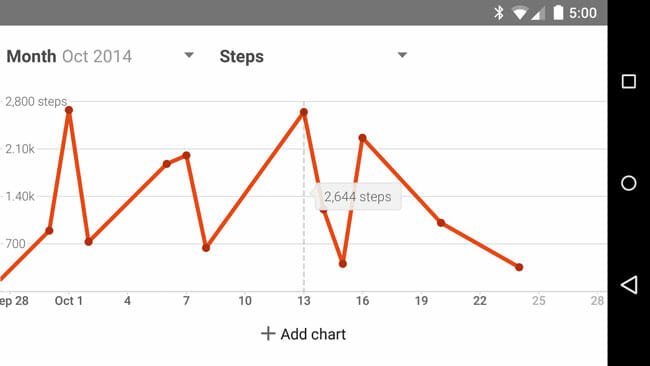
Your daily, weekly,monthly or yearly data can be displayed as a graph easily with a click of a button. This graph can show you the minutes of exercise, or steps taken over this time. This is useful as it gives you a clear view of how you did and what you need to improve on ( or when you need to improve ).

Lastly, Google fit has a key feature that makes it the hub for all fitness apps, This is the fact that it links to loads of fitness/ health apps, and therefore everything you do on them is displayed on your simple, clear,  Google fit page. Apps like Strava and Runtastic  link to Google fit, so whatever you do on them is uploaded to your Google fit, This feature is really useful as it means you don't have to spend time typing in your data on both apps- just one. Also, on Google fit you can see what you have done on all your apps, clearly and colourfully.

Now for the conclusion, and here are my pros and cons-

Pros-

  • Simple, yet very effective, display of all your exercise daily
  • Tracks what you do without yourself having to do anything 
  • Links to a host of other apps to help you see everything you have done.
  • Displays info in a nice graph
  • Integrated with your phone as it is from Google
  • You can use it on smart watches
Cons-

  • Not many features unlike other apps
  • Data may be too simple and vague for those that want more information
  • Can't add sport other than running , cycling or walking without classing it as Other. 
  • Not much is done with your results- no good social integration
  • Goals could be more detailed. 

Overall, I feel Google fit is a great app that ,because of its simplicity, is effective at giving you your exercise minutes everyday of the week. It could be too basic for some, however I feel on a whole it's clear, colourful screen and handy tracker is great reasons to download this free app.

Thank you so much for reading, please view other posts and subscribe- and share this blog to others!
Thanks again, and peace!