Showing posts with label apps. Show all posts

Saturday, 28 March 2015

My Goals Update + New Weights Workout

Welcome to 5.14 Fitness, 

Today I will be posting about how my workouts are going and how I have achieved my goals. 

As I have said, I planned to do Insanity 3 times a week followed by 20 minutes of weight lifting. On the other 3 days, I planned to do weight lifting followed by an abdominal workout. Instead, I have been doing something a little different but still has the same results hopefully. I have also introduced a new weight lifting workout that I will share with you. 

I still follow that basic plan I set, however I have made a few differences to fit in with my schedule. Here is my full week plan:

Monday- 40 mins Insanity followed by 20 mins Weightlifting
Tuesday- 45 mins Weightlifting followed by 15 mins Abdominal workout
Wednesday 25 mins cardio followed by 20 mins Abdominal workout
Thursday- 40 mins Insanity followed by 20 mins Weightlifting  
Friday- 25 mins Abdominal workout 
Saturday- 50 mins Weightlifting  
Sunday- Rest

As you can see, I have 3 core workouts: Cardio, Abdominals and Weightlifting. I do 3 of each every week in order to focus on all the groups. I make sure that I do not have 3 days in a row of weights, as it is important to have a recovery period for your muscles to grow. As I often do not have time for Insanity on Wednesdays like I planned, I do a 25 minute cardio circuit training video which I found on Youtube.
I am still focusing on my Triceps and Biceps and looking to lower my body-fat percentage like I wanted to. This plan Is what I am trying to do every week, however sometimes there are complications and I try my hardest to make up for them. I will post now and again to say if this plan is working and If i am doing too much or too little ( I don't know yet!). I you have any improvements to my plan, I would love some feedback.  

Now onto my new Weightlifting plan. It is called The Ultimate 6-week Home Workout. I am doing it because it only requires dumbbells and a bench, which is what I have. There are 3 parts to it : A legs and shoulders day, a chest and back day and an arms day. I am currently only doing the arms day 3 times a week . I am replacing the other days with arms as I am focusing on that group. 
I do this workout 4 times a week- the full thing on two days and half on the other two ( 3 in total ) . I ma starting straight away on week 2 as week 1 looks a bit to easy. 
Here it is:

Week 1-2       Week 3-4      Week5-6
Standing Biceps Curl                       
2*X 6-8            3 X 8-10       4 X 10-12
Overhead Triceps Extension            
2*X 6-8            3 X 8-10       3 X 10-12
Incline Curl                                      
2 X 6-8            2 X 8-10       3 X 10-12
Weighted Bench Dip                        
2 X 6-8            3 X 8-10       4 X 10-12
One-Arm Incline Preacher Curl                
2 X 6-8            3 X 8-10       3 X 10-12
Lying Triceps Kickback                  
2 X 6-8            3 X 8-10       3 X 10-12
Reverse Curl                                   
3 X 6-8            2 X 8-10       3 X 10-12 

I will keep you updated on this workout. Thank for reading, please subscribe and like (we will like and subscribe back) . Thanks again and peace! 


Thursday, 13 November 2014

Google fit review

Welcome to 5.14 fitness

Hi guys, this is the third fitness/health review that I am doing. This one will be quite brief, as it is about an app that does not have much to it. The app itself is Google fit, and it is simple yet quite effective. It is very similar to apples health, which is also an app that is tailored to specific phones, in healths case IOS. Google fit is an app that you can download from the Google play store, but I expect it will come pre-installed to some phones from android.

The Google fit interface
Google fit is a very basic app, that runs in the background, which is useful. The app is all about tracking what fitness you do during the day, and displaying it to you in a simple and helpful way.
You sign into the app on a Google+ account, and the first set goals that you want. The goals you set are how long you aim to do exercise a day, and Google fit uses this as a basis for everyday. You also add your weight and height, but I am sure that this is not compulsory,

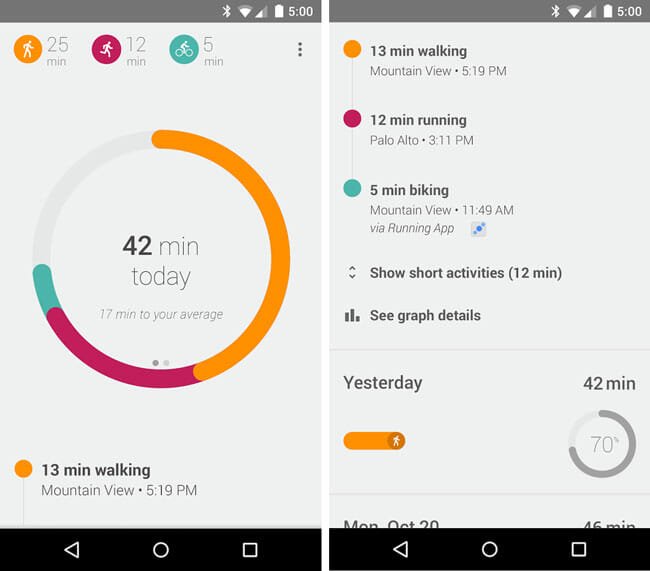
As seen on the right, every day this is the screen that you are welcomed to on Google fit, The circle in the middle is the amount of exercise you have done that day, and as you can see the person in the image has done 42 minutes. When you have completed your time, the circle is complete and an animation occurs to congratulate you on success that day. The best thing about this is, you do not have to do a thing to complete your day, in terms of the app. If you have your phone with you all day , like I do , It tracks whether you ran, cycled or walked without you knowing about it. It is incredibly accurate with this, and I was really surprised to see how long I walked in a day - It was a lot longer than I expected.

As you can see in the picture, Google fit displays the different exercise you have done through different colours, and you can when you did them and how long you did them for, For example, in the picture ,  the person has ran 12 minutes, and you can see at what time of the day he or she ran, Unlike Strava or other apps like it, Google fit just detects when you do this, you yourself does not have to do anything. If you click the display, the circle and data turn to how many steps you have taken, instead of minutes, This , for me , is not very useful; however, it does display if you have exceeded your average or not.

You can also add minutes for when you do weight training, circuit training, or any other sports the phone can not detect. Although, they are all displayed as "other", so there are only four options to put into Google fit: Running, walking , cycling and other, For myself, I always add an extra 45 minutes or so for when I do circuit training at home, so at the end of the day I get a mix of walking and "other", This can not be very helpful as I do not know what "Other" was, but I can easily remember that it was circuit training because that is what I do almost everyday.
Overall, the interface is incredibly slick and nice, and despite it being basic, I really like it and it is so easy to see how long you have done exercise at the end of the day.

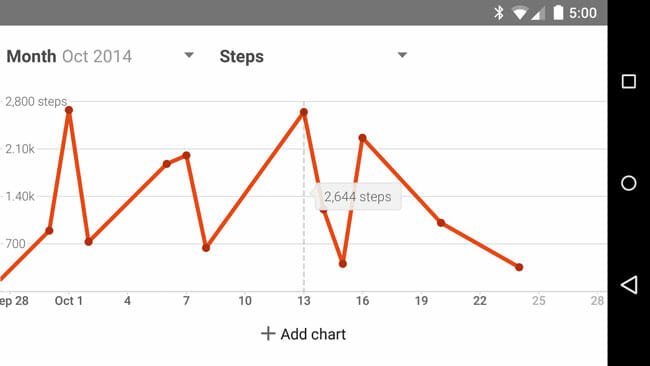
Your daily, weekly,monthly or yearly data can be displayed as a graph easily with a click of a button. This graph can show you the minutes of exercise, or steps taken over this time. This is useful as it gives you a clear view of how you did and what you need to improve on ( or when you need to improve ).

Lastly, Google fit has a key feature that makes it the hub for all fitness apps, This is the fact that it links to loads of fitness/ health apps, and therefore everything you do on them is displayed on your simple, clear,  Google fit page. Apps like Strava and Runtastic  link to Google fit, so whatever you do on them is uploaded to your Google fit, This feature is really useful as it means you don't have to spend time typing in your data on both apps- just one. Also, on Google fit you can see what you have done on all your apps, clearly and colourfully.

Now for the conclusion, and here are my pros and cons-

Pros-

  • Simple, yet very effective, display of all your exercise daily
  • Tracks what you do without yourself having to do anything 
  • Links to a host of other apps to help you see everything you have done.
  • Displays info in a nice graph
  • Integrated with your phone as it is from Google
  • You can use it on smart watches
Cons-

  • Not many features unlike other apps
  • Data may be too simple and vague for those that want more information
  • Can't add sport other than running , cycling or walking without classing it as Other. 
  • Not much is done with your results- no good social integration
  • Goals could be more detailed. 

Overall, I feel Google fit is a great app that ,because of its simplicity, is effective at giving you your exercise minutes everyday of the week. It could be too basic for some, however I feel on a whole it's clear, colourful screen and handy tracker is great reasons to download this free app.

Thank you so much for reading, please view other posts and subscribe- and share this blog to others!
Thanks again, and peace!


Friday, 7 November 2014

Strava review part 2

Welcome to 5.14 fitness,

This is part 2 of the review that I posted yesterday on the fitness app Strava. Strava is an app on both android and IOS that tracks your exercise and presents it to you and your friends in a simple yet beneficial way. The first part of the review has already been posted, so if you haven't seen that, I recommend go checking it out before reading this.

Strava is an app that is based on the website, which has a few more features on it. The website has the usual activity feed and goals, however has a great feature called segments. These are very good for if you are going running. Segments are either big or small routes that other people run or cycle in that particular area.
For each segment, there are times of how other people have done, how quick they went and so on. In my opinion, this is a great way to challenge and give meaning to your run or cycle, This is because with each segment you can try to get the quickest times, and beat other around you. This is also a good way of meeting people and gaining support from other like you.
There are plenty of segments, and I was really surprised to see that there are hundreds of people challenging and racing them. This is, for me, is a brilliant feature and I know of someone who has got top in a segment- something that is very hard to do! There are lots of segments to do, I can spot loads a short distance away from where I live. Some are on streets right next to mine.

Another feature on the website is the route maker. This lets you make routes for your run or cycle, which is then automatically put on your phone ready to start whenever you want.. The route maker is good at giving you the right information, as it tells you things like distance and elevation. It is a good to feature to have, as it gives  you  set goals when doing your exercise, so you know that at the end of it you have achieved what you want. Despite this, I grew very frustrated with the route maker, as it was very hard and slow to do, As I was trying to navigate the map, it would not let me move around, instead plotting new points that I did not want. After what felt like an eternity, I finally managed to get the hang of it, though it meant the process was quite slow. Despite this, the finished product is good and effective, especially on the app.

The premium version of Strava, costing 59 dollars in  US, is not owned myself therefore I can not give my personal opinion on it, yet I can tell you about the features.
Firstly, your goals is vastly improved and you can customise them and set different time scales. You can set goals on segments, which help you to get there sooner , by setting deadlines.
With premium, you can have access to a range of training videos, which may or not be helpful for yourself. The videos give helpful insight on how to do exercise properly.
Premium includes more advanced analysis of everything you do , and it gives you so much data that you'll feel stuffed.  It gives you real-time segments , and even a personal heat map.
Premium includes lots of other things, so go to www.strava.com to find more details.

My final point is on the settings and compatible apps. As you may know, plenty of fitness apps have support for each other, and Strava is one of these. Despite this, Strava only links with a disappointing three other apps, These apps are Instagram, my fitness pal and Google fit. Now Instagram is not a sport app, so really there is only two, My fitness pal and Google fit are both apps which I will be reviewing in future posts, and they are both one of my favourite fitness apps, so at least Strava is linking with some good ones. As for how they link up, there are not many ways in which they do. For more information about this, I will explain when I review the individual apps.

Now for the Conclusion, and here are my Pro's and Cons.

Pro's:


  • Great tracking of Runs and Cycles , with good data feedback and precise tracking.
  • Great social integration, with a great feed layout and plenty of data to compare to yours. 
  • Good reward and accomplishment system. 
  • Nice website with good features on it.
  • Great segments feature, which gives you great motivation to exercise. 
  • Lots of features 
  • App partnerships
Cons

  • Bad support for exercise other than running or cycling.
  • Weak goals system for free app
  • Have to pay a lot for premium version, which is not that different to standard. 
  • Slow and annoying route builder 
  • Not many compatible apps to link with 

Overall, I think that Strava is a great app for running and cycling, arguably the best out there. It is great from a social point of view, and has lots of features to make it great. If you are more of a circuit training or weight lifting person, then this is probably not the best for you. If I were to rank it out of ten, I would give it a ;

7/10


Be sure to stay tuned for new app reviews, The next app being reviewed is myfitnesspal- a personal favourite. Thank you very much for reading , hope you liked this review, and please hit like or subscribe to this blog. Thanks again, and peace!


Thursday, 6 November 2014

Strava review part 1

Welcome to 5.14 Fitness,

In today's post I will be writing about a fitness app that is ,in my opinion, highly effective and fun. If you like this, then I will add more posts about other top apps that are great for fitness and health. There are many, however I will pick the ones that I feel are best for a wide range of people and interests.

Now,the app I am going to be writing about is called Strava, and you may have heard about it. When it comes to fitness apps, it is one of the most popular out there. It has over a million downloads on Google play, and has a 4.6 star rating.

Strava is an app for mainly the Cardio activities of running and cycling, however it can be used for workouts as well. Strava records when you run or cycle and tracks exactly what you do and when you did it. It then gives you all the Statistics you want about your activity: how fast you went, how long you took, how many calories burned and so on... It gives information that is very useful, and can portray it all in a graph for you. And now the best part, with a simple click your data is uploaded to your feed, available for all your friends on Strava and  people round the world to see and compare to their own.

Just like Facebook or twitter, Strava has an activity feed page, which shows all your friends recent activity, how they did, and gives you the option to like or comment on it. This is great for morale, as not only friend but those like you can give you praise and support through this. This can be a really good boost for morale. This links to a great feature that makes Strava a really great app for running and cycling. For every route you run or cycle, there is an accomplishment and reward scheme that gives you prestigious rankings like 'king of the mountain'. This means of all those following the route, you were the quickest. Things like these make going for a run or cycle competitive and gives you more energy to go outside and attack your exercise. There are many accomplishments that gives you rewards for great work and commitment, all of which make Strava an app that is different from others.The activity feed page is good, and easy to navigate and see everything you want.

Away from the social aspect, Strava sets goals for you based on your information and these are a basis for when you run or cycle. Of course, you can change these goals at any time. The goals aspect of the app is quite weak compared to other apps I have used , and it is not prominent on the app- it doesn't come up at any point on the home screen. Then again,this is improved when you go premium;however, this costs 37 pounds ( 59 dollars ) and therefore may put you off. For more information, Premium will be discussed more in the next post.

Going back to recording activity, as soon as you open Strava you are presented with a button. Hit this button, and Strava starts tracking your location with Gps and internet ( if wanted to use ). Strava tracks how long you have been , your distance , you split pace and where you are instantly, so whilst you are out you can see all this information. Once you are done, you press the button again and it stops tracking you, ready to publish your run or cycle and give you all the data about it.  The layout of all this is quite simple, so will not confuse . Due to this, the information displayed during your run or cycle is quite simple and not much data is shown. Afterwards, there is lots of data to look at.
As soon as you finish, it gives you options on what to call your exercise, what to tag it as and what to describe it as.  You can choose who you want to see this, and it can be all your friends to just yourself.
Running and cycling is not the only things that you can add to your log. You can , with a click of a button,, add a variety of sports including workouts and weight training. You can add how long you did this for and add a description. Despite this being a good feature, logging in activity's other than running and cycling is not as satisfactory, as no data is produced. You can not specify what you did in the workout , therefore there is not much use in logging it in . If this is improved, and made more prominent, then Strava will be a lot better for those who do more circuit training and weight lifting.

In the next post, I will explain about the Strava website, the other features the app offers, the premium version, and the overall conclusion- including the pros and cons of Strava.
Hope you enjoyed this review, thank you very much for reading, and please check out all the other posts. Thank you again !